

Yono Rummy Company card games occupy a curious space in India’s digital landscape — wildly popular, legally nuanced, and just technical enough in their installation process to trip up first-time users. Perhaps a friend recommended Jaiho 777, or an advertisement promising quick winnings caught your eye, and now you find yourself staring at an installation process that looks nothing like downloading a typical app from the Play Store.
First, a Reality Check You Shouldn’t Skip
Before we get into buttons and settings, let’s talk about something more important: whether you can even legally use this app where you live. Rummy occupies this odd middle ground in Indian law — courts have generally treated it as a “game of skill” rather than pure gambling, which is the whole reason these apps exist and operate openly in most states.
But “most states” is not “all states.” Some states have outright banned real money rummy websites, like Telangana, Andhra Pradesh, Assam, Odisha, Nagaland, and Sikkim. If you do happen to live in one of these, you will not do yourself any favors by downloading the app, as you may get into trouble with the law.
And now this — this stuff is variable! Over the past few years, state governments have changed their policies on gaming several times; anything you heard six months ago could have changed.
Step 1: Know Where You Are Actually Downloading From
Here’s something that surprises a lot of first-time users: Jaiho 777 almost certainly won’t be sitting there on the Google Play Store waiting for you. Google’s policy generally keeps real-money card games off the Play Store in most regions, so the app makers have to work around that. In practice, this means you will be getting the app one of two ways:
Through the Official Website
Type the web address in yourself instead of tapping a link. Do not click on the link sent through WhatsApp or Telegram — you can end up with a fake copy of a popular rummy app. If you Google “Jaiho 777 download” and get a wall of different-looking sites all claiming to be official, that is your signal to slow down, not speed up. Scammers know these apps are popular, and cloned download pages are a well-worn trick.
Through a Direct APK File
As you are skipping the Play Store, you are essentially sideloading the app — downloading the installer file directly and letting your phone install it manually. This is completely normal for this category of app and not something to be nervous about, but it does mean your phone is going to actively try to stop you at first, which brings us to the next step.
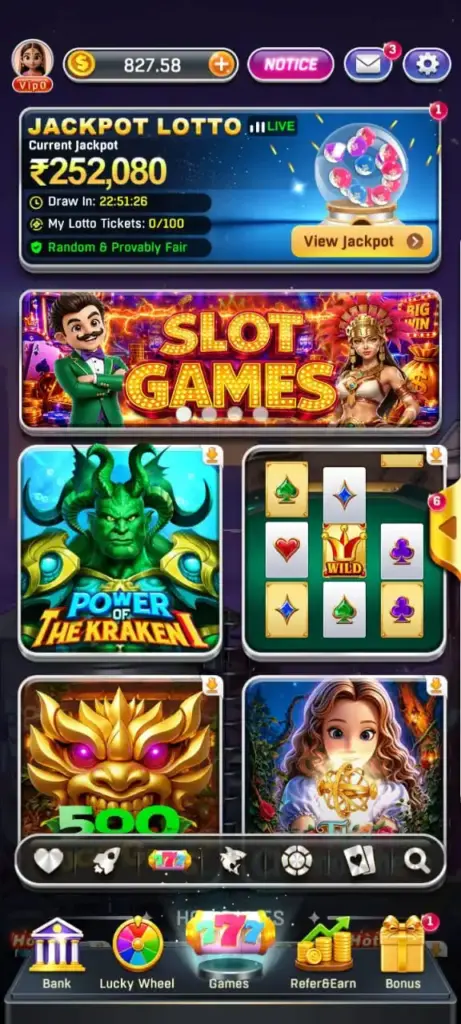
Step 2: Tell Your Phone It’s Okay (Enabling Unknown Sources)
Android is built to protect you from installing random files off the internet, so by default, it’ll block the APK the moment you try to open it. You have to manually tell it this particular installation is fine. Here’s how:
- Open Settings.
- Tap into Apps (some phones label this Apps & Notifications).
- Find Special App Access, then Install Unknown Apps.
- Choose whichever app you are using to install the file — usually your browser (Chrome) or your file manager.
- Flip on Allow from this source.
Note for Older Devices: If you are on an older phone running Android 7 or earlier, this lives somewhere slightly different — under Settings > Security > Unknown Sources — as one single switch instead of an app-by-app setting.
One habit worth picking up here: only grant this permission to the specific app you are using right now, and honestly, consider switching it back off once you are done installing. It’s a small extra step, but leaving “install unknown apps” permanently switched on across your whole phone is one of those things that feels harmless until, one day, it isn’t.
Step 3: Actually Installing the App
With that permission sorted, go back to the official site and download the APK. It’ll land in your Downloads folder, same as any other file. Tap it once it finishes, and you will get a screen listing out everything the app wants permission to access — storage, network, maybe your camera (this one’s usually for identity verification later, not anything sinister).
Take ten seconds to actually look at this list instead of tapping through it on autopilot. If something looks off — say, it’s asking for access to your contacts or your text messages for no clear reason — stop before you continue.
The install itself is quick, usually under a minute depending on your phone and connection.
Step 4: If You Are on iPhone, Heads Up — It’s a Bit Different
iOS users have a rougher time with this category of app, and it’s not really Jaiho 777’s fault — Apple is notoriously strict about real-money gaming apps in the App Store, stricter even than Google is. So there’s typically no native iOS app to speak of. What you will usually find instead is:
- A Mobile Website Version: Runs through Safari and works reasonably well for most people.
- No Native Access: Depending on how the platform has set things up.
If anyone suggests installing a “configuration profile” to get the app working on iPhone, treat that with real caution. That method hands an app a level of access to your device that a normal App Store app never gets, and it’s become a fairly common trick used in scams targeting iPhone users specifically. If you are unsure, it’s worth reading up on that particular method before agreeing to anything.
Step 5: Setting Up Your Account & KYC
Once the app’s actually open, you need to open an account. Insert your phone number, OTP, and a few basic details. You will be asked for KYC (Know Your Customer) verification, which you need to complete before you are allowed to withdraw any winnings. Usually, a PAN card upload plus a linked bank account or UPI ID is required.
Important Legal & Financial Details:
- TDS Deductions: Any winnings over a certain amount get taxed at the source — a flat 30% TDS under Section 194B of the Income Tax Act, deducted automatically before the money ever reaches you. This isn’t a rummy-app policy; it’s Indian tax law, and it applies whether you like it or not.
- Account Ownership: Only use a bank account or UPI ID that is genuinely yours for KYC. People try to use a family member’s details to get around age restrictions or state bans. It can create real legal trouble for both people involved.
Step 6: Staying Updated
Because you are outside the Play Store’s ecosystem, there’s no automatic little update badge quietly doing its thing in the background. You will typically get an in-app prompt when a new version’s out, or you will need to check back on the official site every so often for a fresh APK. It’s a small extra bit of upkeep compared to a normal app, but skipping it for months means you might be running a version with security holes that have already been patched in newer releases.
Frequently Asked Questions (FAQ)
Why is the app not found on the Google Play Store?
As per Google’s policies, real-money card games are kept off the Play Store in most regions. Therefore, platforms like Jaiho 777 distribute their APK through their own official website instead.
Is it safe to download the APK directly?
Yes, if you download it directly from the official website by typing the address in yourself rather than clicking random links from messaging platforms.
Can I install Jaiho 777 on an iPhone?
Generally, no native app is available. Apple’s App Store policies are stricter than Google’s regarding real-money gaming apps, so iPhone users typically play via the mobile website version instead.
Keep This In Mind Before You Start Playing
Getting the app installed is genuinely the easy part of all this. What matters more is what happens after you open it for the first time.
- Set Limits Early: Decide on a spending limit before you start, not somewhere in the middle of a losing streak when it’s much harder to think clearly.
- Expect Losses: Treat whatever you put in as money that might just not come back — that is the honest way to think about any real-money game, rummy included.
- Know When to Stop: If you ever catch yourself playing longer than you meant to, chasing a loss to “get it back,” or feeling that low, anxious pit in your stomach checking your balance — that is not nothing. That is worth paying attention to, not brushing off because you are mid-game.